
Download AMBackup – Secure, Versatile Data Protection Tool for Windows, macOS & Linux
Overview
AMBackup, created by Amro Mousa, is a versatile data protection solution that combines simplicity with powerful backup options. Whether you need a quick local copy, a physical disc archive, or a remote FTP repository, AMBackup delivers a smooth, user‑friendly experience. The software’s core philosophy is to give users multiple pathways to safeguard their files while keeping the process intuitive and reliable.
By integrating copy, burn, FTP, and zip functionalities into a single interface, AMBackup eliminates the need for several disparate tools, reducing both cost and complexity. Its modular design lets you choose the most suitable backup method for any scenario—whether you’re a home user protecting family photos, a freelancer securing project files, or an IT manager tasked with enterprise‑level data resilience. The program runs on the major desktop operating systems, supports automatic scheduling, and offers clear status notifications, making it an all‑in‑one answer for data safety.
In short, AMBackup is built for anyone who values peace of mind when it comes to digital assets.
Core Features that Make AMBackup Stand Out
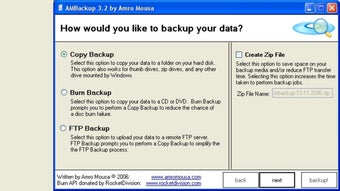
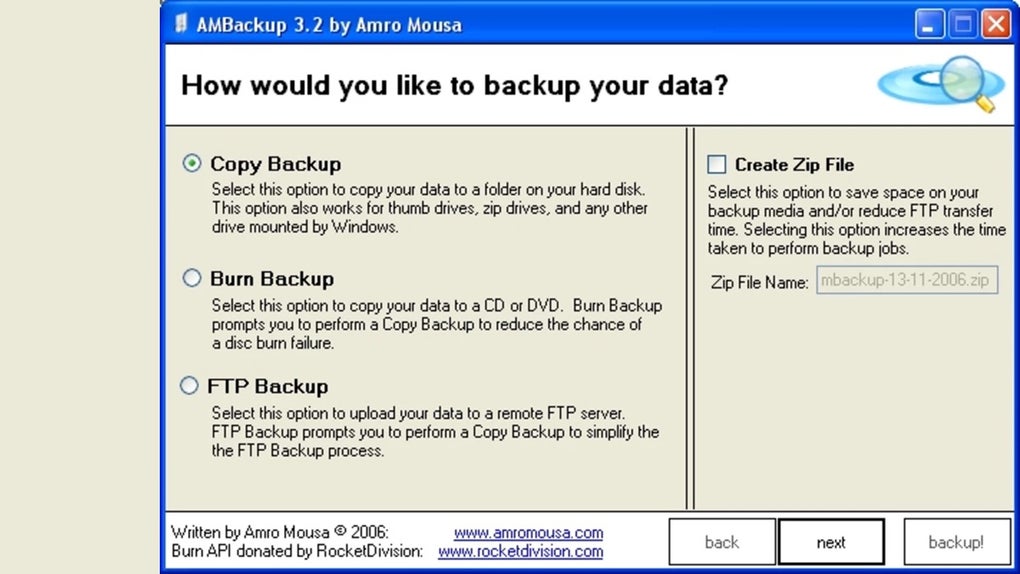
- Copy Backup: Instantly duplicate selected folders or files to any local drive, external USB, network share, or secondary partition. The process is drag‑and‑drop friendly, and you can set filters to include only certain file types.
- Burn Backup: Burn your data onto CDs or DVDs directly from the application. AMBackup automatically recommends a prior Copy Backup to guarantee that the data you write to disc is complete and error‑free.
- FTP Backup: Seamlessly upload archives to remote FTP servers for off‑site storage. Built‑in encryption options (FTPS) keep the transfer secure, and you can schedule recurring uploads.
- Create Zip File: Compress selected files into a ZIP archive, reducing storage footprint and speeding up transfers. The zip utility supports password protection and split archives for very large datasets.
- Automatic Scheduling & Smart Sync: Define daily, weekly, or monthly backup cycles. AMBackup tracks changes and only backs up new or modified files, saving time and bandwidth.
- Integrity Checks & Logs: After each backup, the software runs checksum verification and logs any errors, giving you a transparent view of the backup health.
- Multi‑Platform Support: Native installers for Windows 10/11, macOS Catalina and later, and major Linux distributions (Debian/Ubuntu, Fedora).
- Lightweight & Secure: The installer is under 20 MB, and the program runs with minimal system overhead while employing industry‑standard encryption for ZIP and FTP operations.
These features collectively provide a robust safety net for any data scenario. The flexibility to switch between local, physical, and remote storage means you can adapt your backup strategy as your needs evolve, without learning a new tool each time. Moreover, the intuitive UI, built with clear icons and step‑by‑step wizards, reduces the learning curve, ensuring that even non‑technical users can protect their data confidently.
Installation, Usage Instructions & Compatibility
Step‑by‑Step Installation
- Visit the official AMBackup website and click the Download button for your operating system (Windows, macOS, or Linux).
- Run the installer file:
- Windows:
AMBackup_Setup.exe - macOS:
AMBackup.pkg - Linux:
ambackup.deb(Debian/Ubuntu) orambackup.rpm(Fedora/RedHat).
- Windows:
- Follow the on‑screen prompts—accept the license agreement, choose the destination folder (default is
C:\Program Files\AMBackupon Windows), and click Install. - When the installation finishes, launch AMBackup from the Start Menu, Applications folder, or your desktop shortcut.
Getting Started with a Basic Copy Backup
Upon first launch, the Welcome Wizard guides you through creating your first backup set:
- Select Copy Backup from the main dashboard.
- Choose the source folder (e.g.,
DocumentsorPictures). - Pick a destination drive or network share. AMBackup will display free space and recommend the best target.
- Optionally enable Schedule to run the backup daily at a chosen time.
- Click Start Backup. A progress bar shows real‑time status, and a log file records each action.
Advanced Usage: Burn, FTP, and Zip
For physical media, select Burn Backup. The wizard will ask you to insert a blank CD/DVD, then automatically start the burning process after confirming the prior copy backup. For remote storage, choose FTP Backup, enter your server credentials, and set the remote directory. The application encrypts the connection using FTPS by default, and you can schedule automatic uploads after each local backup completes. Finally, the Create Zip File option lets you compress files into a password‑protected archive, ideal for emailing or storing on limited‑capacity drives.
Compatibility Details
AMBackup runs on the following platforms:
- Windows 10, Windows 11 (64‑bit)
- macOS Catalina (10.15) and later (Intel & Apple Silicon)
- Linux distributions: Debian/Ubuntu (DEB package), Fedora/RedHat (RPM package), and generic tarball for other flavors.
The software requires at least 2 GB RAM and 50 MB of free disk space for installation. It integrates with the native file explorer on each OS, so you can right‑click any folder and launch a quick backup without opening the main UI. Automatic updates are delivered via a built‑in updater, ensuring you always have the latest security patches and feature enhancements.
Pros, Cons, & Frequently Asked Questions
Pros
- All‑in‑one solution covering local, physical, and remote backups.
- Simple, wizard‑driven interface suitable for beginners.
- Supports scheduled and incremental backups to save time.
- Secure FTP (FTPS) and password‑protected ZIP files keep data safe.
- Lightweight installer and low system resource consumption.
- Cross‑platform compatibility eliminates the need for multiple tools.
Cons
- No built‑in cloud storage (relies on user‑provided FTP servers).
- Burn Backup requires a CD/DVD writer, which is becoming less common.
- Advanced users may miss granular scripting capabilities.
- Free version lacks multi‑user management for enterprise environments.
FAQ – Your Backup Questions Answered
Is AMBackup completely free to use?
Yes, AMBackup is offered as a free utility for personal and small‑business use. A paid “Pro” tier is planned for future releases, which will add multi‑user licensing and advanced reporting.
Can I encrypt my backups?
AMBackup provides password protection for ZIP archives and uses FTPS for secure FTP transfers. For full‑disk encryption, you should combine AMBackup with OS‑level encryption tools such as BitLocker or FileVault.
How does AMBackup handle large files over 4 GB?
When creating ZIP files, AMBackup automatically switches to the ZIP64 format, allowing archives larger than 4 GB. For burn backups, the software splits the data across multiple discs if needed.
Does AMBackup support incremental backups?
Yes, the application tracks file changes and only backs up new or modified files during scheduled runs, reducing both time and storage consumption.
Can I restore data from a burned CD/DVD?
Absolutely. Insert the disc, open AMBackup, and choose the Restore from Disc option. The software will verify the disc’s integrity before copying files back to your selected location.
Conclusion – Secure Your Files Today
AMBackup delivers a comprehensive, easy‑to‑use backup suite that meets the needs of both casual home users and small‑business professionals. Its multi‑modal approach—offering copy, burn, FTP, and zip capabilities—means you never have to juggle separate utilities to protect different types of data. While the lack of native cloud storage and advanced enterprise features may limit its appeal for large organizations, the free version provides more than enough functionality for most personal and SMB scenarios. The intuitive interface, built‑in integrity checks, and cross‑platform support make AMBackup a trustworthy ally in the fight against data loss. If you’re looking for a secure, lightweight, and versatile tool to safeguard your files, download AMBackup now and start building a resilient backup strategy today.







